
Download Soundy Mouse – Free Mouse Sound Effects for Windows, Add Fun to Cursor Movement
Transform your everyday mouse movements into an entertaining experience with Soundy Mouse, a lightweight, free software designed for Windows users who love playful distractions. This quirky yet functional tool adds customizable sound effects to every cursor movement, making your computer interaction more engaging and fun. Whether you're looking to spice up your workday, prank a colleague, or simply enjoy a bit of digital whimsy, Soundy Mouse delivers a unique twist to your desktop experience.
With a minimal footprint and simple setup, it’s ideal for users who appreciate clever little tools that don’t slow down their system. Since its release in 2005, Soundy Mouse has gained popularity across regions like Singapore, Bangladesh, and South Africa, proving that even the simplest software can leave a lasting impression. Despite its age, it remains a favorite among fans of quirky desktop enhancements.
Download Soundy Mouse today and turn your cursor into a musical instrument of mischief and joy.
Why Soundy Mouse Stands Out Among Free Desktop Tools
When it comes to free software that adds a touch of fun to everyday computing, Soundy Mouse is a standout choice. Unlike many bloated applications that consume system resources, this tool is remarkably lightweight—perfect for older machines running Windows 98 or earlier versions. Its minimal design philosophy ensures that it doesn’t slow down your system while delivering a unique sensory experience.
The core concept is simple yet brilliant: every time you move your mouse, a sound plays—whether it’s a squeaky wheel, a cartoon "boing," or a typewriter click. This feature transforms the mundane act of cursor movement into something playful and interactive. What makes Soundy Mouse particularly appealing is its nostalgic charm.
Released in 2005, it taps into the early days of digital fun, where users sought creative ways to personalize their desktops beyond just themes and wallpapers. It’s not just a tool; it’s a digital prankster, a mood booster, and a conversation starter all in one. The fact that it’s still used in countries like Singapore, Bangladesh, and South Africa speaks volumes about its enduring appeal.
Despite no recent updates, its stability and simplicity make it a reliable option for users who value functionality over flashy features. Plus, being free and available in English, it’s accessible to a global audience. Whether you're a student, office worker, or just someone who enjoys a bit of digital humor, Soundy Mouse adds a layer of delight to your computing routine.
It’s a reminder that sometimes, the simplest software can bring the most joy.
How to Install and Use Soundy Mouse on Your Windows PC
Getting started with Soundy Mouse is quick and straightforward, especially for users familiar with older Windows systems. First, visit a trusted software repository or archive site that hosts legacy applications—since Soundy Mouse is no longer actively maintained, official download links may be limited. Once you’ve located a verified source, download the installer file (typically a .exe file) and run it.
The installation process is minimal: you’ll be prompted to choose a destination folder, but no complex configurations are required. After installation, launch the program from the Start menu or desktop shortcut. Upon opening, Soundy Mouse runs in the background, often with a small icon in the system tray.
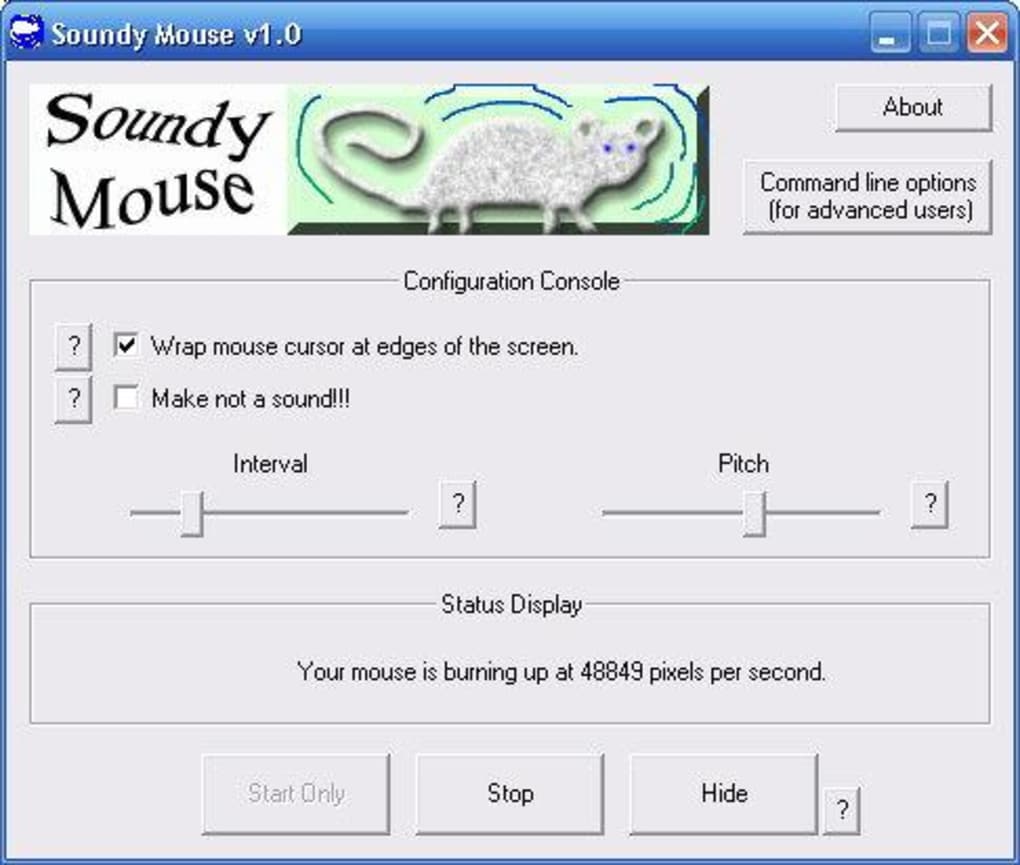
To activate sound effects, simply move your mouse across the screen—the default sounds will play automatically. Customization options are limited but functional: you can select from a small library of preloaded sounds such as "Squeak," "Boing," "Click," or "Typewriter." These sounds are triggered based on movement speed and direction, creating a dynamic auditory feedback loop. For example, faster movements might produce louder or more energetic sounds.
While the software lacks advanced settings like volume control or custom sound uploads, its simplicity is part of its charm. It’s designed to be plug-and-play. If you want to disable the sounds temporarily, just right-click the system tray icon and select "Pause" or "Exit." This makes it ideal for professional environments where you might need to mute it during meetings.
Overall, the user experience is intuitive and hassle-free, perfect for users who prefer no-frills tools that just work.
Key Features of Soundy Mouse (itemprop="featureList")
- Lightweight design – consumes minimal system resources, ideal for older PCs
- Real-time mouse movement sound effects – adds audio feedback to cursor motion
- Multiple built-in sound presets – includes squeaks, boings, clicks, and typewriter sounds
- Simple installation – no complex setup required, works on Windows 98 and earlier
- Free to download and use – no hidden costs or trial limitations
- Runs in background – small system tray icon for easy access and control
Compatibility and System Requirements
Soundy Mouse is specifically designed for older versions of the Windows operating system, including Windows 98, ME, and earlier. This makes it incompatible with modern systems like Windows 10, 11, or newer macOS versions. However, for users still running legacy Windows environments—whether on vintage hardware, educational labs, or retro computing setups—this software remains a viable and enjoyable option.
It doesn’t require high-end specifications, making it perfect for low-memory machines where newer applications would struggle. The software is only available in English, which limits its accessibility for non-English speakers but ensures clarity for its target audience. Since it was last updated in 2005, it’s important to note that it may not support modern hardware or security protocols.
For this reason, users should exercise caution when downloading from third-party sites and ensure they’re using trusted sources to avoid malware. That said, its long-standing presence in software archives and consistent download numbers (over 35,000 since 2005) suggest it’s been vetted by the community. If you're running a Windows 98 system or exploring retro computing, Soundy Mouse is a nostalgic gem worth trying.
It’s also a great tool for developers testing legacy applications or educators demonstrating early PC software concepts. While it may not suit modern users, it remains a valuable piece of digital history and a fun tool for those who appreciate simplicity and charm in software design.
Pros and Cons of Soundy Mouse
Pros
- Extremely lightweight and fast to load
- Free to download and use with no ads
- Fun and engaging for pranksters or office humor
- Works on older Windows systems where modern apps fail
- Simple setup with no technical knowledge needed
Cons
- Not compatible with Windows 10/11 or macOS
- No customization options for sound volume or timing
- Outdated interface and no recent updates
- Limited sound library – only a few preset effects
- May trigger security warnings on modern antivirus software
Frequently Asked Questions (FAQ)
Is Soundy Mouse safe to download?
Yes, Soundy Mouse is generally safe to download when obtained from reputable software archives or trusted websites. Since it’s been around since 2005 and has over 35,000 downloads, it has a strong track record. However, because it’s an older program, some modern antivirus programs may flag it due to outdated signatures. Always scan the downloaded file with a current antivirus tool before running it.
Can I use Soundy Mouse on Windows 10 or 11?
Unfortunately, Soundy Mouse is not compatible with Windows 10 or 11. It was designed for Windows 98 and earlier versions. Running it on modern systems may result in errors or crashes. However, you can try using compatibility mode or running it in a virtual machine with an older Windows version.
Does Soundy Mouse support custom sounds?
No, Soundy Mouse does not allow users to upload or replace custom sound files. It only includes a small set of built-in sound effects. If you need more customization, consider alternative tools like Sound Pilot or Mouse Cursor Themes with audio features.
How do I stop the sounds temporarily?
Right-click the Soundy Mouse icon in the system tray (usually near the clock), and select "Pause" or "Exit." This will stop the sound effects immediately. You can re-enable it later by reopening the application.
Is Soundy Mouse still being updated?
No, the last update was on October 21, 2005. The software is no longer actively maintained. However, its stability and simplicity mean it continues to work reliably on compatible systems.
Final Verdict: A Nostalgic Gem for Retro Computing Enthusiasts
While Soundy Mouse may not be the most advanced tool on the market, it excels in its niche. For users running older Windows systems or those who appreciate digital nostalgia, it’s a delightful addition to the desktop. Its ability to turn mouse movement into a playful audio experience is both clever and entertaining.
Though it lacks modern features like customization and cross-platform support, its simplicity is its greatest strength. If you’re looking for a free, secure, and fun way to add personality to your cursor, Soundy Mouse delivers. It’s perfect for office pranks, classroom demonstrations, or just adding a smile to your day.
Despite its age, it remains a beloved tool among fans of quirky software. Download Soundy Mouse today and rediscover the joy of simple, creative computing.
Download Soundy Mouse now and bring some fun to your cursor movements—free, secure, and ready to use on Windows 98 and earlier!







